PC gamers who own high-refresh monitors or lack access to NVIDIA’s latest GPUs now have a way to force-enable advanced AI upscaling and frame generation in supported games—without requiring a compatible graphics card. DLSS Enabler, an open-source mod developed by community artur07305, injects NVIDIA’s proprietary DLSS 2.0 and 3.0 technologies into any DirectX 12 game that originally supports them, extending their functionality to AMD, Intel, and even older NVIDIA GPUs.
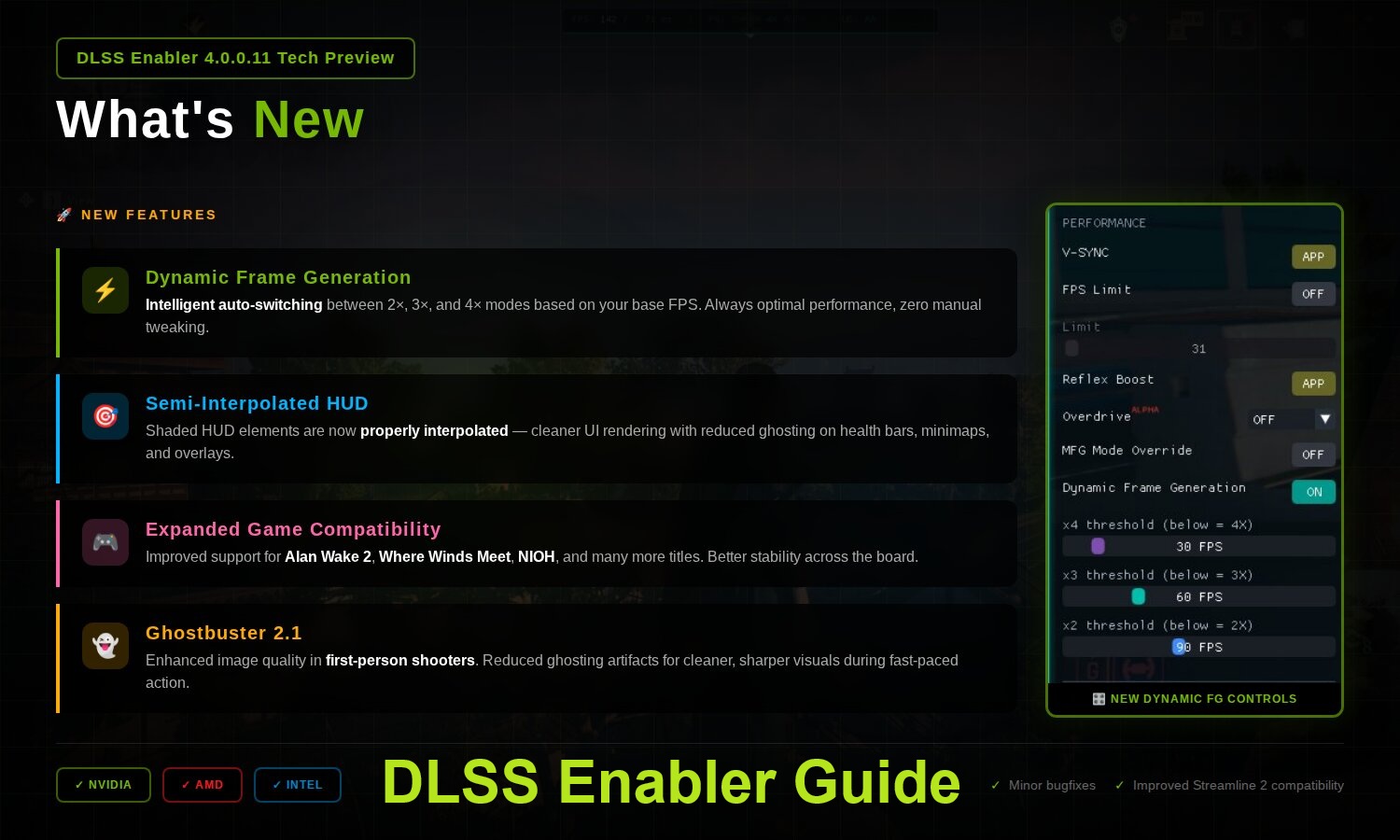
The mod’s latest experimental builds introduce features like Multi Frame Generation (MFG)—which can generate up to four interpolated frames per rendered frame—Dynamic Frame Generation (adjusting frame generation on the fly to hit target framerates), and Screen-Space Ray Traced Global Illumination (SSRTGI), a lightweight alternative to hardware-accelerated ray tracing. While these features mimic NVIDIA’s proprietary tech, they rely on modified versions of AMD’s FSR 3.1 Frame Generation code and NVIDIA’s open-source Streamline framework, rather than the RT cores found in RTX 40-series GPUs.
Who should care? The mod is primarily useful for
- Owners of non-NVIDIA GPUs (AMD Radeon, Intel Arc) who want DLSS 3.0’s frame generation in supported games.
- Gamers with high-refresh monitors (144Hz+) seeking smoother performance in GPU-bound scenes.
- Players on older NVIDIA GPUs (e.g., RTX 30-series) who lack DLSS 4.0’s Multi Frame Generation.
- Users without RT cores who want basic ray-traced lighting effects via SSRTGI.
However, stability varies—experimental builds may introduce artifacts, latency spikes, or compatibility issues in some games. The mod also carries anti-cheat risks in multiplayer titles.
How DLSS Enabler Works: Key Features
The mod leverages DirectX 12’s injection capabilities to override game rendering pipelines. Here’s what it enables
- Multi Frame Generation (2X/3X/4X): Generates additional interpolated frames beyond NVIDIA’s standard 2X, potentially boosting smoothness on 144Hz+ displays. Requires games with Streamline DLL v2.7.2+.
- Dynamic Frame Generation: Adjusts frame generation dynamically to hit a target framerate, balancing smoothness and responsiveness.
- Screen-Space Ray Traced GI (SSRTGI): Simulates global illumination and soft shadows without hardware RT, using temporal upscaling data. Performance impact varies by quality preset.
- Universal Upscaling (via OptiScaler): Allows switching between DLSS, FSR, and XeSS upscalers in games that natively support only one.
For example, in Cyberpunk 2077, enabling MFG 4X on an RTX 4090 (which doesn’t natively support it) can push frame rates higher on a 240Hz monitor, though at the cost of occasional flickering in fast-moving scenes. SSRTGI adds subtle indirect lighting effects comparable to ray tracing but with minimal performance cost—though results depend on the game’s rendering pipeline.
Installation: Stable vs. Experimental
Installation differs between the stable (3.x) and experimental (4.0.0.2+) branches
- Stable Releases (3.x): Uses a guided installer that automatically places DLLs in game folders. Supports basic DLSS upscaling and frame generation.
- Tech Preview (4.0.0.2+): Requires manual DLL placement (rename to
version.dll,winmm.dll, etc.) and may cause instability. Enables MFG, Dynamic FG, and SSRTGI.
For experimental builds, place the DLL in the game’s bin/x64 folder alongside the executable. Access settings via the tilde key (`) in-game. Always back up original files before modifying them.
Real-World Performance: Trade-Offs and Limits
Testing on a high-end system (Core i7-14700K, RTX 4090, 1440p/240Hz) revealed
- Multi Frame Generation: MFG 3X/4X modes improved smoothness but introduced visible artifacts (e.g., shadow flickering) compared to native DLSS FG 2X.
- SSRTGI: Added depth to scenes but with a performance cost—Ultra mode matched ray-traced GI intensity, while Medium offered a balance for weaker GPUs.
- Dynamic Frame Generation: Helped stabilize framerates but required tuning to avoid over/under-generation.
Compatibility hinges on the game’s DirectX 12 implementation. Titles like Cyberpunk 2077 and Alan Wake 2 work well, but complex rendering pipelines may limit features. Anti-cheat systems (e.g., BattlEye) may flag DLL injection as suspicious.
Should You Use It?
DLSS Enabler expands access to cutting-edge AI rendering tech, but with caveats
- Pros: Unlocks frame generation and upscaling on incompatible GPUs; SSRTGI adds ray-traced lighting without RT cores.
- Cons: Experimental builds risk crashes or artifacts; anti-cheat risks in multiplayer; not all games support all features.
For single-player or anti-cheat-free games, the mod offers compelling performance gains—especially on high-refresh displays. However, users should test stability in their specific titles before relying on it for long sessions.
Availability: The mod is free and open-source, hosted on Nexus Mods. Stable releases are recommended for casual use; experimental builds require technical comfort.