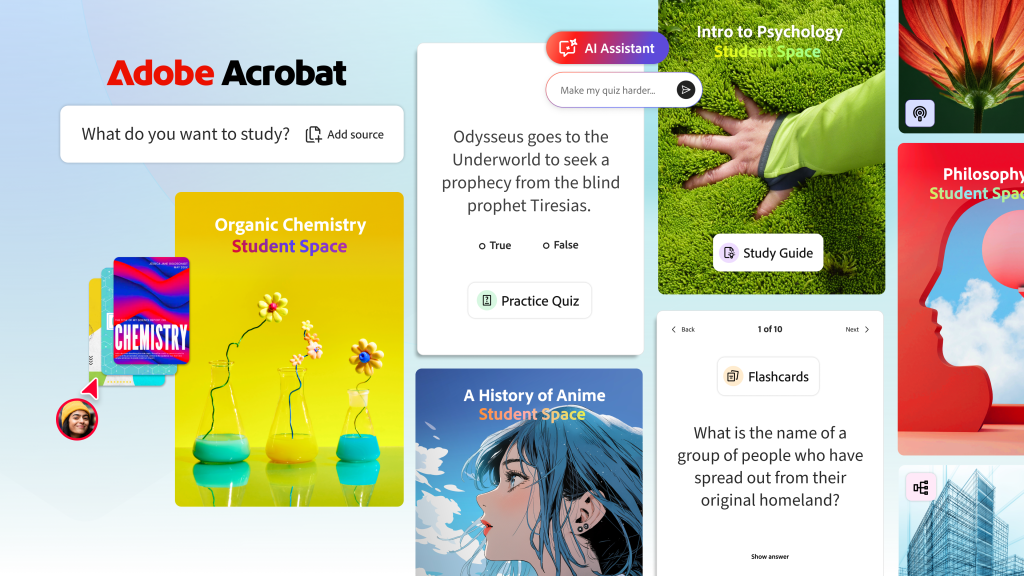
Adobe has rolled out a new tool called Student Spaces, aiming to transform how students learn and collaborate. The platform is built to integrate smoothly with Adobe Creative Cloud, promising to boost productivity and creativity in academic environments.
The tool is designed to provide students with an organized space where they can work on projects, share ideas, and receive feedback from peers and instructors. It offers a variety of features that cater specifically to the needs of students, making it easier for them to manage their workload and stay motivated.
Key Features of Student Spaces
- Collaboration Hub: Students can create and join spaces dedicated to specific courses or projects. These spaces serve as central hubs where all relevant materials, assignments, and discussions are consolidated.
- Adobe Creative Cloud Integration: Seamless access to Adobe's suite of creative tools, including Photoshop, Illustrator, and InDesign, directly within the Student Spaces platform. This integration allows students to work on their projects without switching between different applications.
- Feedback and Review Tools: Built-in tools for instructors to provide feedback on student work, as well as peer-to-peer review features that encourage collaborative learning.
- Project Management: Features like task lists, deadlines, and progress tracking help students stay organized and meet their academic goals.
The platform is currently available for free to all educational institutions, making it an accessible option for students around the world. Adobe's goal with Student Spaces is to create a more engaging and efficient learning experience that leverages the power of its existing Creative Cloud tools.
Potential Limitations and Considerations
While Student Spaces offers a robust set of features, there are a few considerations to keep in mind. Firstly, the tool's effectiveness may vary depending on the size and structure of an educational institution. Smaller institutions or those with less technical infrastructure might face challenges in fully utilizing the platform.
Additionally, the success of Student Spaces will depend heavily on its adoption by both students and instructors. For this to happen, comprehensive training and support will be necessary. Adobe will likely need to invest in educational resources and ongoing support to ensure that users can maximize the tool's potential.
Another aspect to consider is the integration with existing learning management systems (LMS). While Adobe has designed Student Spaces to work seamlessly with Creative Cloud, its compatibility with other popular LMS platforms like Blackboard or Canvas remains to be seen. This could be a significant factor for institutions looking to adopt the tool.
Despite these potential limitations, Student Spaces represents a significant step forward in Adobe's commitment to supporting education. By combining powerful creative tools with collaborative features, it has the potential to reshape the learning experience for students worldwide. As the platform continues to evolve, its impact on education will be closely watched by both educators and industry observers.