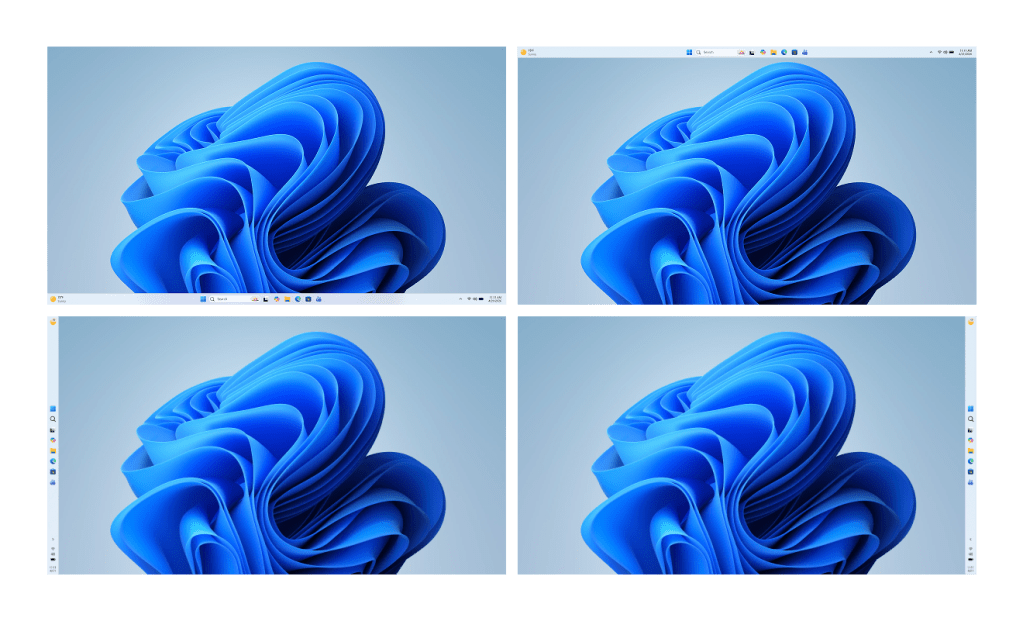
For decades, the Windows taskbar has been a fixed fixture at the bottom of the screen, but that may soon change with an upcoming Windows 11 update. A developer leak, which surfaced without official confirmation, shows the taskbar can now be repositioned to the left, right, or top of a single display, along with adjustable width settings. While no release date has been announced, the underlying code suggests this feature is part of a larger redesign codenamed Fluent Taskbar and Adaptive Frame.
This mobility introduces new considerations for IT teams that rely on standardized desktop images. Security baselines that pin icons to the bottom may need revisiting, and remote management tools could require updates to handle dynamic layouts. End-user support teams should also prepare for potential help-desk tickets if the change is rolled out without comprehensive documentation.
Key details
- Taskbar movement: The taskbar can be dragged to the left, right, or top of a single display. There is no indication yet on multi-screen support.
- Width adjustment: Sliders appear in the video allowing manual sizing from narrow icons to full desktop width.
- Underlying code: References to Fluent Taskbar and Adaptive Frame point to a broader redesign beyond positioning.
The leak does not confirm whether this will be a free update for existing Windows 10 or 11 systems, but past patterns suggest it may arrive as part of the next major cumulative update cycle. IT teams should factor in potential re-imaging or policy adjustments if they rely on locked-down taskbar configurations.
Why it matters
A movable taskbar could significantly alter workflows and introduce new deployment complexities. For enterprises with standardized desktop images, this change may require revisiting security baselines and remote management tools. Additionally, end-user support teams should be prepared for potential help-desk tickets if the change is rolled out without comprehensive documentation.
What to watch next
- Official confirmation from Microsoft in an upcoming Insider preview or public blog post.
- Clarification on multi-monitor behavior and whether legacy pinned items migrate smoothly.
- Pricing model—whether it lands as a free update or tied to a paid feature pack.
The taskbar has remained fixed since Windows 95, so any shift will mark a significant departure. IT leaders should begin stress-testing their imaging pipelines and monitoring the Microsoft Update ring for the first public glimpse. This change could also impact user training and support strategies, as users may need to adapt to new taskbar layouts.
In summary, while the exact timing and scope of this feature remain unclear, IT teams should start preparing for potential changes in workflow and upgrade strategies. By staying informed and proactive, they can minimize disruptions and ensure a smooth transition.